Before posting, make sure that:
- The suggestion is not in the Car Crushers 2 Trello Trello
- It has not been suggested in the forum already (Search or check the “your topic is similar to..” tab)
If it already exists, like that instead to increase the chances of it being added!
Hi,
I’ve heard that there’s gonna be customisation update (from the update logs and the high qty. of requests), so why not improve and enhance the filters, too? I know this is in the Trello (or I think it is), but I have a specific idea as to how to do it.
This is what the filters would look like:
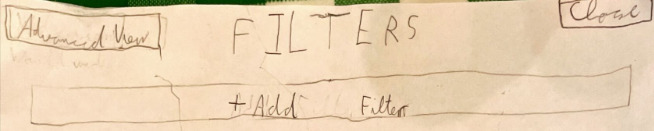
Excuse the bad writing from now on;). Anyways, when you press the [+Add Filter], the following will appear:

*I meant to put [Choose Filter Type to Proceed]. Filter type would be all the current filter types (race class, drivetrain, specific search, etc.) plus some more. Choose filter type to proceed: this Parameter area would vary depending on the filter type itself. It could be a True/False dropdown, a text box, or just a dropdown in general. Here are the filter types and parameters for them that I suggest:
| Column 1 | Column 2 | Column 3 | Column 4 |
|---|---|---|---|
| Vehicle Filter Name | Parameters | Parameters meanings | Notes |
| Vehicle Stat Range | Stat▼ Min. Max. | ▼ means dropdown. Min. and Max. are numbers | |
| Vehicle Stat Comparison | Stat 1▼ [Sign] Stat 2▼ Diff. Min. Max. | [Sign] means one of the comparison signs (>, <, ≥, ≤, =). Probably a dropdown. | Some comparisons wouldn’t make sense, but if you are a silly person, just go ahead! |
| [both] | N/A | N/A | If Min. is left blank, then it is assumed as negative infinity. If Max. is left blank, it is assumed as (positive) infinity. |
All you need is imagination (and forum suggestions) to think of more filters to add!
Now about that button in the top left over there, the [Advanced View] button. Apart from making the Filters window bigger, it would add another possibility that would open a few doors: Next to each filter you add, there’d be a number, which you could change. This number determines whether a filter gets applied alongside all the other filters, or separately. Example:
1 | Stat Range Money | Min. 0 Max. 1M
1 | Stat Range Value | Min. 95B Max. 95B
This filters out vehicles priced between 0 and 1M Money, with value maxed out.
1 | Stat Range Money | Min. 0 Max. 1M
2 | Stat Range Value | Min. 95B Max. 95B
This filters out vehicles priced between 0 and 1M Money AND vehicles with value maxed out.
One could think of this as assigning each filter to a group (or more!), just that each group filters separately. Here are a few more filter ideas, some of which have probably already been suggested in the forum, but they deserve an honourable mention:
Requirement, Dropdown (None, VIP, Group Access, Limited, etc.)
Owned, True/False (the false bit is useful when you want to buy a new platina vehicle, so you don’t have to filter through them all)
Drive Access, True/False. [Sidenote: Drive access means you purchased the vehicle (maybe it was limited) but still don’t have the money required to unlock and earn money from it].
[22/12] I have just thought of something else, but I haven’t drawn it out yet. Will do when I get home. Anyway, it would consist of saving filters to reuse them quicker, especially useful for Derby and Race modes. There would be a tab, in advanced filters mode, labelled Saved Filters. Here, you could find filters that could save across sessions. You would assign a name to each filter. So a filter would occupy, in the Saved Filters section, 2 rows. One for naming the filter, the second for the filter itself. Now, remember at the beginning of the suggestion there was a button for adding a filter. This should change to two buttons: Add filter, and Add Saved Filter. Saved Filters would be like other filters, just that the name gets displayed in the drop down instead of the filter type, and the filter parameters would be a True/False dropdown.
Why These Enhanced Filters Matter
1. Searching by How Cars Behave (Not Just What They Are)
-
Example: On tight race tracks, a player sets Handling > Acceleration Diff. Min 1 Max.___ to avoid cars that overshoot corners.
-
Example: A stunt player uses Weight < 2000 kg to locate cars that stay controllable in mid‑air.
2. Faster, Smarter Car Selection
-
Example: A player preparing for a race uses Acceleration ≥ 15 to quickly find competitive launch cars.
-
Example: A collector filters Owned = false to see only vehicles they still need to buy.
I hope you like my idea, and that it gets added if you do. FEEDBACK WANTED!
 . Anyway we could probably consider that a revive considering 18 days had passed!