cc21
1
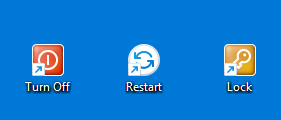
Here are the steps (windows 10)
1 : right click on desktop > New > Shortcut
2 :chose your action : shutdown /s /t 0 to shut down
shutdown /r /t 0 to restart or
rundll32.exe user32.dll,LockWorkStation to lock pc
ex: cmd /k shutdown /r /t 0
after that click Next < Finish
Adittional step to change icon : right click your shortcut < Properties < Change Icon… Then chose the icon you want!
cc21
2
here are the copy past : cmd /k shutdown /r /t 0 (restart)
cmd /k shutdown /s /t 0 (turn off)
cmd /k rundll32.exe user32.dll,LockWorkStation (go to lock screen)
cc21
5
well.. do you have a windows computer?
cc21
6
beceause you’ll need windows 10, powershell, cmd (admin) and i don’t know apple’s system so i don’t think i can help you with that, sorry.
cc21
7
if you want more information just ask me!
i just press win+X then press U twice
its way easier
cc21
9
yea but have those button is cool, right?